
To create a Multi Select question for your external program form toggle Required on/off, whichever is applicable for that question; if this is on then there must be data for the question in your import file.
Then fill in all fields for that question:
|
Question Label |
This label will appear as the question text on the individual record reports. |
|
Question Column Name |
This label will appear the column headers in the template you will use to import your data; only alpha-numeric characters, '-', and '_' are allowed. The number of columns in the template will match the number of possible answers on your Multi Select question. This field cannot be edited after the question is saved. |
|
Question Type |
Multi Select - for questions where multiple responses could apply. This field cannot be edited after the question is saved. |
|
Data Type |
This determines what type of data may be imported to the question. Options are:
This field cannot be edited after the question is saved. |
|
Scored |
Indicate if the question is scored and assign the point value if it is. |
You will then create the answer set for your question; for each answer enter the:
|
Answer Label |
This label will appear as the answer text on the individual record reports. |
|
Answer Value |
You will use this value in your import file to indicate that this answer was selected; only alpha-numeric characters, '-', and '_' are allowed. This field cannot be edited after the question is saved. |
|
Points |
If the question is scored, indicate the point value of that answer. |
Click on Add Answer to create additional answer responses for a question.
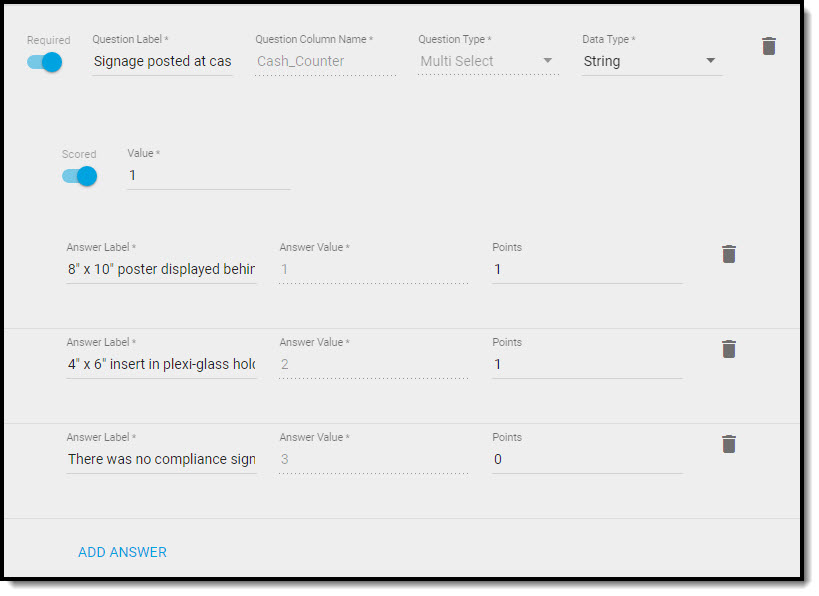
Example of a Multi Select Question Setup
Comments
0 comments
Article is closed for comments.